
For the room you're sitting in, not the one you're running.
Point your own phone at the lecture, the meeting, or the sermon and read a live transcript — translated if you want it. It stays in your history afterwards, where you can search it, annotate it, and ask it questions.
One person, one session · $24.99 / month, or an hour pack that never expires
The sessions nobody is going to run for you.
Everything else on this site is about a room someone is hosting. This is the other half: you are in the audience, and the room is not going to solve it.
Lectures, classes, and training
Following a lecture in a language you learned as an adult means either listening or writing, never both. A live transcript takes the note-taking off you — and if the course is in a language you are still building, read it in yours instead.
- Highlight a line as it goes past and add your own note to it
- Ask what the lecturer actually said about something, afterwards
Meetings, site visits, and interviews
Transcribe in the original language, or translate as it happens when the meeting isn't in yours. Recording is a separate switch you turn on, so a session can leave a written record and no audio at all if that is what you want. Tell people first. Consent rules for recording and transcribing vary by country and by setting, and this is your call to make, not ours.
Services and talks in another language
When the church, conference, or community meeting you are attending doesn't run translation, you can still follow it — you bring the translation with you instead of waiting for the venue to offer it.
A conversation, not an audience
Conversation mode turns two phones into a two-way translated exchange — each person speaks their own language and reads the other's. Useful for a viewing, an appointment, a neighbour, a supplier.
Something you already have a link to
Paste a link to an episode from Apple Podcasts, Spotify, or an RSS feed and get the same transcript, translation, notes, and questions over it — the audio does not have to be happening in front of you.
Where you should not rely on this
This is a tool for following and remembering, not a professional interpreting or transcription service. Do not lean on it for a medical consultation, a legal appointment, a contract negotiation, or anything where a mistranslated sentence has consequences — those need a qualified human, and no monthly subscription changes that.
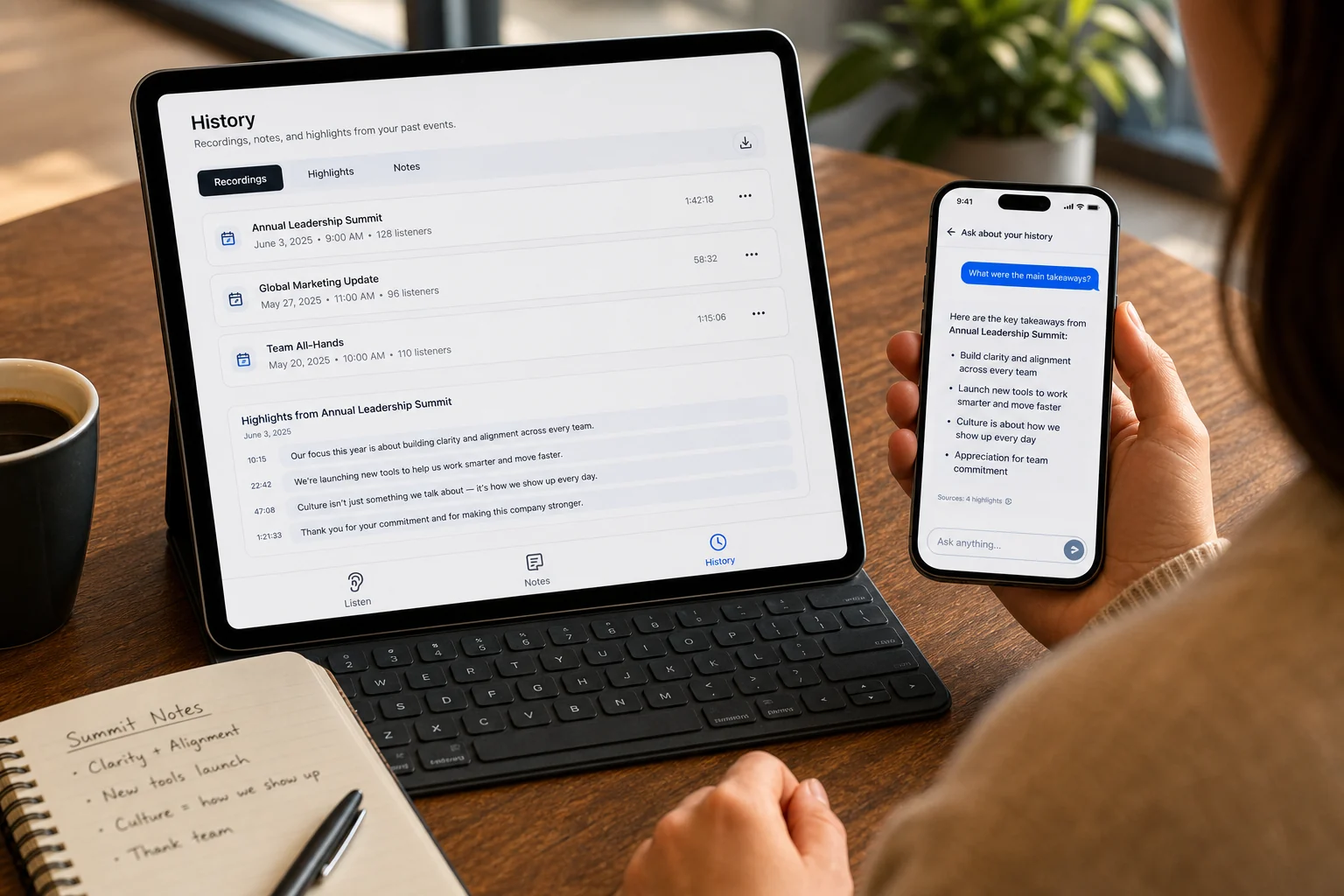
Everything you've sat through, in one searchable place.
The value isn't only in the hour itself. Every session you capture lands in a history that stays yours — with your highlights, your notes, your photos, and the audio if you kept it.
- Search across everything you've captured, not one session at a time
- Ask and recap, grounded in the transcript rather than invented — see Koine Intelligence
- Private to you — a personal session is not published anywhere and has no audience
- Or share it with up to 50 people, when the point was to bring someone else along
Three taps, and the mic in your pocket.
Start a session for yourself
In the Koine app on iPhone or Android, choose For myself instead of joining someone else's room.
Transcript, or translation
Leave it on the original language to just transcribe, or pick a language to read it in. You can switch mid-session.
Read, mark, and keep
Highlight lines and add notes while it runs. It's in your history the moment it ends.
Your phone's own microphone works for a normal room. For a large hall, a lecture theatre, or anywhere you're sitting far from the speaker, a clip-on or lavalier mic makes a much bigger difference than anything in the software.
Two personal plans.
Live Pro is for capturing your own sessions. Plus is for getting more out of ones you attended — and it's already included in Live Pro. Buy either on the web and it works straight away in the app on the same account.
Capture your own
Koine Live Pro
Best for lectures, meetings, and talks you attend regularly.
- 1 live session at a time
- Up to 3 languages
- 4 language-hours a month, plus hour packs that never expire
- Transcript only uses a third of an hour per hour
- Share with up to 50 listeners
- Includes Koine Plus
Get more from what you heard
Koine Plus
Best for people who mostly join other people's sessions.
- Ask questions about what you heard
- Summaries, study cards, and review audio
- Synced history across your devices
Running a room instead?
Organization plans
Personal plans cover one person and one session. Colleagues, several rooms at once, and shared billing need an organization plan.
See organization plans →Prices in USD, the same on the web and in the App Store and Google Play. Annual billing saves two months. Manage or cancel any time in your account.
Questions about using it for yourself.
Is it legal to transcribe a meeting I'm in?
That depends entirely on where you are and what the meeting is, and it is your responsibility rather than ours. The short version everywhere: tell people. We built the recording switch to default to off, and a session can keep the text without keeping any audio, but neither of those is legal cover.
Which phone do I need?
Capturing your own session works in the Koine app on iPhone and on Android. Joining someone else's room also works in any phone browser.
What does a "language-hour" mean here?
One language translated for one hour. Transcribing without translating is cheaper — it uses about a third of an hour for each hour you capture, so the four hours included in Live Pro stretch to roughly twelve hours of plain transcription.
Can I keep the audio?
Yes, with a per-session switch. Leave it off and only the transcript is kept and the audio is discarded. Turn it on and you get replay afterwards as well.
Does the room I'm in know I'm doing this?
Not from us. A personal session is your own and is not visible to whoever is speaking. Which is exactly why the honest answer to the first question above is to tell them yourself.
Can I switch from transcribing to translating halfway through?
Yes — pick a language mid-session and the translation starts from that point. It bills from when you turn it on, and you can turn it back off again.